


فیلتر شکن قوی پرسرعت Maple VPN
4.772.13K Reviews
App Specs
- Version
- 1.8
- Updated On
- License
- Free
- Downloads
- 10,000,000+
- Developer
- ZARISAN
- Categories
- Tools
- Platform
- Android
Screenshots



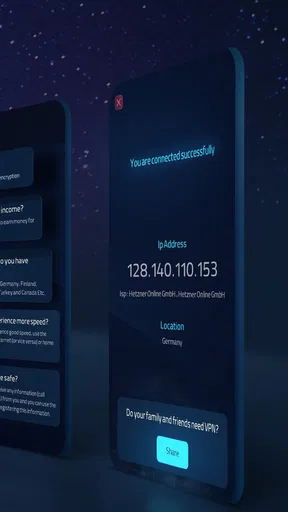
 Analysis by AppCompare
When I choose a VPN, I start with the everyday job I need it to do: protect a connection on public Wi-Fi, make a routine browsing session feel more private, or help me reach a service that behaves differently by region. I also weigh the trade-off between a quick connection and the control offered by more configurable tools. فیلتر شکن قوی پرسرعت Maple VPN is aimed at people who want a straightforward tool in the VPN category rather than a complicated networking project.
That distinction matters. A VPN can change how your traffic is routed, but it does not make every website safe, prevent every kind of tracking, or guarantee access to every region-locked service. I treat it as one part of sensible online habits, not a substitute for careful browsing. If you mainly want a simple on/off option for ordinary use, this app is more relevant than a tool that expects you to tune connection settings yourself.
What I would check before relying on it
Maple VPN is a free Tools app from ZARISAN, with an Everyone age rating. It has a 4.7 average from around 386,000 ratings, alongside roughly 72,000 written reviews, and more than 10 million installs. Those figures suggest that many people have tried it, but popularity alone does not tell me how a VPN will behave on my particular network or whether it suits my privacy expectations.
The app was released on October 30, 2023, and its current version is 1.8, with Android 6.0 as the minimum OS. For a practical decision, I would first check that my phone meets that requirement, then try it on the connection where I expect to use it. A quick test at home may feel different from using a crowded café network or a weak mobile signal, so I would not judge reliability from a single session.
I would also decide what “fast enough” means for my own routine. Reading pages and sending messages do not demand the same connection quality as video calls or large downloads. If stable, low-latency access is essential for work, I would test those exact activities before making Maple VPN my default. A VPN adds another step between a device and an online service, so some change in speed or responsiveness is always a reasonable possibility.
Getting Started with Maple VPN
First things first, downloading فیلتر شکن قوی پرسرعت Maple VPN was a breeze. It’s available on both Android and iOS platforms, so regardless of your device, you’re good to go. The installation process was quick, and once installed, the app has a clean and intuitive interface that’s easy to navigate, even if you’re not particularly tech-savvy.
Upon launching the app, you’re greeted with a simple, user-friendly dashboard. No complicated settings or confusing options. It’s straight to the point, which is exactly what you want in a VPN app—speed and efficiency without any hassle.
Worth Reading Before You Choose

EA SPORTS FC Mobile 26 Is a Bigger Football Game, but It Takes Time

Flipboard Shows What News Apps Must Do Beyond the Feed

Switching to Android Auto Means Rethinking Your Driving Routine

Google Calendar Makes a Crowded Week Easier to Manage

Ludo King Makes the Most of the Minutes Between Plans

Baby Panda World Brings Quick Play to Modern Phones, but Its Game Library Feels Busy
Features That Stand Out
One of the standout features of Maple VPN is its wide range of server locations. You’ve got a plethora of options to choose from, which is fantastic if you’re trying to bypass geo-restrictions or simply want to ensure you have the fastest connection possible. The ability to switch between servers is seamless, and I didn’t experience any noticeable lag during my tests.
Security is, of course, a critical aspect of any VPN, and Maple VPN doesn’t disappoint. It uses robust encryption protocols to keep your data safe from prying eyes. Whether you’re browsing from a coffee shop or your home network, you can feel secure knowing your information is protected.
Choosing a server for the task
Server choice is most useful when it is tied to a specific need, rather than treated as a contest to find the farthest location. For everyday browsing, I would start with a nearby option and see whether pages load normally. If I need to check how a service appears in another region, I would choose a location that matches that purpose, then test the service itself; changing a VPN server cannot guarantee that a platform will accept the connection.
One practical habit is to keep a simple note of which location worked for a recurring task and whether it stayed responsive at the time I used it. That is more useful than switching repeatedly without a reason. If a page stalls, I would try one alternative location and then return to the ordinary connection if the problem persists. This keeps troubleshooting focused and makes it easier to tell whether the VPN is the cause.
For sensitive work, I would not assume that an encryption claim answers every privacy question. I would avoid entering account details on suspicious pages, keep apps and the operating system updated, and use the security controls already available in my accounts. A VPN can help protect traffic on an untrusted network, but it does not make a phishing link trustworthy or remove the need to check what information I am sharing.
Performance: Speed and Reliability
Let’s talk speed. A common issue with many VPNs is the drop in connection speed, but Maple VPN manages to maintain a fast and stable connection. I streamed videos, played online games, and went about my usual browsing without any hiccups. The app delivers on its promise of being a فیلتر شکن قوی پرسرعت, living up to its name as a strong, high-speed VPN.
Another aspect worth mentioning is the app’s reliability. During my usage, I didn’t experience any sudden disconnections, which is a huge plus. Consistency is key when it comes to VPNs, and Maple VPN seems to have nailed it.
A realistic day-to-day test
Imagine I am answering messages on a café’s Wi-Fi, then opening a map and checking a couple of work pages before heading out. I would connect before signing in to anything, confirm that the pages I need still load, and avoid assuming that every service will behave exactly as it did without a VPN. If a video call becomes choppy, I would compare it with the same call on my usual connection rather than keep changing settings at random.
This kind of small, repeatable test helps answer the question many people have: will it work for my normal routine? I would try the same sequence at home and on mobile data, too. If the connection is smooth in one place but not another, the local network may be part of the issue. For gaming or live calls, where delays are more noticeable, I would be especially cautious about treating a general impression of speed as a guarantee.
Another useful check is what happens when I stop using the VPN. If a banking app, streaming service, or workplace sign-in behaves unusually while connected, I would disconnect and see whether the issue clears before changing account settings. Some services react to VPN traffic as a security measure. That does not necessarily mean the app is broken; it may simply mean that the service wants an ordinary connection for that task.
Usability and Support
Maple VPN scores high on usability. The interface is designed to be intuitive with minimal learning curve involved. Whether you’re a seasoned VPN user or a newbie, you’ll find it easy to navigate. The app also features a helpful FAQ section and customer support that’s responsive and ready to assist should you encounter any issues.
If you’re worried about data usage, the app provides insights into your bandwidth consumption, ensuring you can manage your usage efficiently. This feature is particularly useful if you’re on a limited data plan and need to keep an eye on your activity.
Who benefits from a simple setup
I think the strongest fit is someone who wants a low-friction VPN for occasional browsing, especially when moving between familiar networks and public Wi-Fi. A clear dashboard can reduce the temptation to fiddle with settings that the user does not understand. The usage insights can also help someone on a limited mobile plan notice whether VPN sessions coincide with heavier browsing, though the meter is best treated as a guide to activity rather than a promise about a carrier’s billing.
People who want a detailed control panel, specialist connection options, or a carefully documented privacy setup may prefer a more configurable VPN from the start. Likewise, if I need a service for work that has strict security requirements, I would follow my organization’s approved setup rather than pick a personal app for convenience. Maple VPN’s simple approach is a strength for quick use, but simplicity is not the same thing as a fit for every policy or technical need.
How it compares with other VPN approaches
Compared with browser-only privacy tools, a VPN app is meant to cover more than activity inside one browser, which can be useful when I switch between apps. A browser proxy or privacy extension may be enough if I only care about one browser task and want fewer changes to the rest of the phone. By contrast, a more advanced VPN may suit someone who wants greater control and is willing to spend time learning its settings. I would choose based on the scope of the task, not on the assumption that one category is automatically safer.
There is also a difference between a general VPN and a service designed for a specific purpose, such as a company’s private network. If I need access to internal work systems, I would use the instructions from the employer. If my priority is simply easier everyday browsing, a straightforward app may be more comfortable. The important question is whether the tool matches the network and service I am trying to use, not whether it has the longest feature list.
Because Maple VPN is free, the direct cost is easy to understand, but I would still make a deliberate choice about trust and privacy. Before using any VPN for sensitive activity, I would read the app’s current privacy information and consider whether its approach matches my needs. A VPN provider becomes part of the path your traffic takes, so convenience should not be the only factor for someone handling confidential material.
Switching without making a mess
If I am replacing another VPN, I would avoid running both at once. I would disconnect the old service, install or open the new one, and test a few ordinary sites before relying on it for a time-sensitive task. Keeping the first trial short also makes it easier to spot problems: if a login fails or a page loads slowly, I can compare with the old connection rather than trying to diagnose several changes together.
I would also revisit apps that remember a region or network state. A service may keep showing the same content after a location change because it has stored account or app data, not because the VPN failed. In that situation, I would close and reopen the service before repeatedly switching servers. This is a small troubleshooting step, but it can save time and prevent needless changes to a connection that is working normally.
For anyone deciding whether to keep it, I would use a short checklist based on real needs: does it connect when I need it, do my usual sites and apps still work, and is the speed acceptable for the tasks I care about? If the answer is no on the network I use most, switching to another option may be wiser than trying to force a fit. If the answers are yes, there is little reason to complicate a simple routine.
Final Thoughts
All in all, فیلتر شکن قوی پرسرعت Maple VPN is a solid choice if you’re looking for a fast, secure, and reliable VPN service. It’s easy to use, packed with features, and does exactly what it says on the tin. Whether you’re looking to enhance your online privacy, unblock content, or simply enjoy a smoother browsing experience, Maple VPN has got you covered.
So, if you’re ready to give your online security a boost and enjoy unrestricted internet access, head over to the download link and give Maple VPN a try. Happy browsing!
My recommendation is to treat it as a convenient first try, not an automatic answer to every privacy or access problem. It makes the most sense for someone who values a simple interface and wants to test a free VPN against ordinary needs. I would skip it if I needed a documented, organization-approved connection, unusually detailed controls, or dependable performance for a critical live task without first testing it on that exact network.
For a casual user, I would install it, try one familiar site and one task that matters, then decide based on how those behave rather than on the app’s name or popularity. If the experience is comfortable, its straightforward style is the point. If it introduces friction or does not suit a particular service, choosing a different kind of privacy tool is a sensible decision, not a failure to use the app correctly.
Pros
- Easy to connect with one tap functionality.
- Supports multiple server locations worldwide.
- No registration required for quick access.
- Minimal impact on device battery life.
- Intuitive interface for seamless navigation.
Cons
- Contains ads that may disrupt user experience.
- Limited features available in the free version.
- Occasional connection drops in high traffic.
- No dedicated customer support for issues.
- May not bypass all regional restrictions.
FAQs for فیلتر شکن قوی پرسرعت Maple VPN
What platforms is Maple VPN available on?
Maple VPN is available for both Android and iOS devices. Users can download the app from the Google Play Store for Android devices or the Apple App Store for iOS devices. Ensure your device meets the minimum operating system requirements to enjoy a seamless VPN experience.
Is Maple VPN a free service, or does it offer any premium features?
Maple VPN offers both free and premium services. The free version provides basic VPN functionality, while the premium version unlocks additional features such as faster connection speeds, more server locations, and enhanced security protocols. Users can choose a subscription plan that best fits their needs.
How secure is Maple VPN in protecting my data online?
Maple VPN employs strong encryption protocols to ensure your data remains secure while you browse the internet. It masks your IP address and encrypts your online activities, protecting you from hackers and snoopers. Always check for updates to ensure you have the latest security features.
Can I use Maple VPN to access geo-restricted content?
Yes, Maple VPN allows you to bypass geo-restrictions and access content that may not be available in your region. By connecting to servers in different countries, you can enjoy streaming services, websites, and apps that are otherwise restricted in your location.
Does Maple VPN affect internet speed?
While using any VPN can potentially slow down your internet speed due to encryption overhead, Maple VPN is designed to minimize this impact. Premium users often experience faster connections due to access to high-speed servers. Testing with different server locations can help optimize speed.


